

NEW IN PRO!
Improve Your Squarespace SEO With Clear, Actionable Recommendations
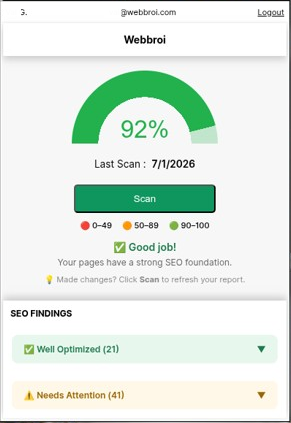
SEO Grader helps you identify page-level SEO opportunities, understand what needs attention, and improve your Squarespace website with clear, actionable recommendations.
Included at no additional cost with SquareTools Extension PRO.
Why SEO Grader?
Identify Issues
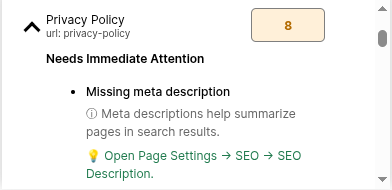
Quickly discover missing SEO elements
such as meta descriptions,
H1 headings, image alt text,
Open Graph images, and more.
Understand Priorities
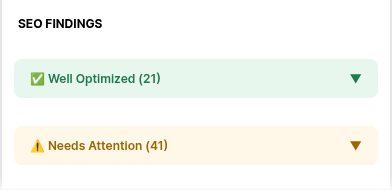
Issues are grouped by importance so you know what to fix first and what can wait.
Improve Over Time
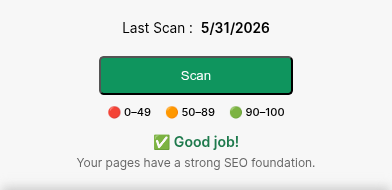
Update pages, re-scan, and track your progress with a simple scoring system designed to encourage
improvement.
What You’re Getting
✓ SEO Score Tracking
✓ Missing H1 Detection
✓ Missing Meta Description
Detection
✓ Missing Alt Text Detection
✓ Open Graph Image Checks
✓ Duplicate Heading
Detection
✓ SEO Fix Tutorials
✓ Beginner Friendly Guidance
✓ Responsive Customer
Support
Ready to Improve Your Squarespace SEO Today?
SEO Grader helps you identify issues, understand priorities, and improve your pages with clear, actionable recommendations.
✓ Included with SquareTools Extension PRO
✓ Works with Squarespace 7.0 and 7.1
✓ Beginner-friendly recommendations
Frequently Asked Questions
-
Yes, you need a SquareTools Extension PRO subscription because it’s part of the subscription.
For existing SquareTools Extension PRO users, the SEO Grader tool is FREE.
-
Yes, SEO Grader supports both Squarespace 7.0 and 7.1 websites.
-
Yes, the SEO Grader Tool only works on Squarespace websites. It does not work on other website platforms.
And like the SquareTools Extension, you need access to the site to use it because it requires permission to scan the pages.
What type of access do I need?
Admin access is NOT necessary. Any permission type will do as long as you can access the website pages.
-
No, it does not.
The SEO Grader only reads your website texts and metadata when analyzing your website SEO. It does not alter or change your pages when providing recommendations.
Recommendations are simply recommendations.
Following the SEO suggestions and making the recommended changes requires your action.
-
SEO Grader scans common page-level SEO elements, including:
SEO titles
Meta descriptions
H1 headings
Image alt text
Open Graph images
and other optimization opportunities.
Collection items such as blog posts, products, portfolio items, events, and other collection-based content are currently NOT included in the scan results.
-
We recommend running a new scan whenever you:
Publish new pages
Update page content
Add images
Make SEO changes
This helps you track improvements over time.
-
Yes, SEO Grader is beginner friendly, simple and straightforward.
Click the scan button to analyze your pages.
Wait for the results.
Follow the recommendations and open the tutorials if you need instructions.
Analyze your pages again to check if your score improved.
-
No, the SEO Grader tool will not guarantee Google rankings.
But it will help advance or maintain your current ranking by identifying common SEO issues based on Google’s guidelines for ranking.
And points out opportunities to improve your website's overall SEO foundation.
Think about it like a diet and you’re trying to lose weight. The diet alone will not miraculously give you results.
But if you follow it, make the suggested changes, and follow through, you will get closer to your goal.
-
SEO Grader supports both Squarespace 7.0 and 7.1 websites.
However, some legacy Index Pages in Squarespace 7.0 may not expose all content in a way that can be fully analyzed. In these cases, SEO Grader may return limited SEO findings for those pages.
This is a platform limitation related to how certain legacy Index Pages are structured and does not affect standard pages or Squarespace 7.1 websites.
For the most accurate analysis, we recommend using standard pages where possible or upgrading legacy content to newer Squarespace page structures.