
Squarespace SEO Grader Instructions
Welcome to the SEO Grader Instructions Guide.
This guide explains the most common SEO findings reported by SEO Grader and provides step-by-step instructions for addressing them in Squarespace.
Use the links below to quickly jump to a specific topic.
Quick Navigation:
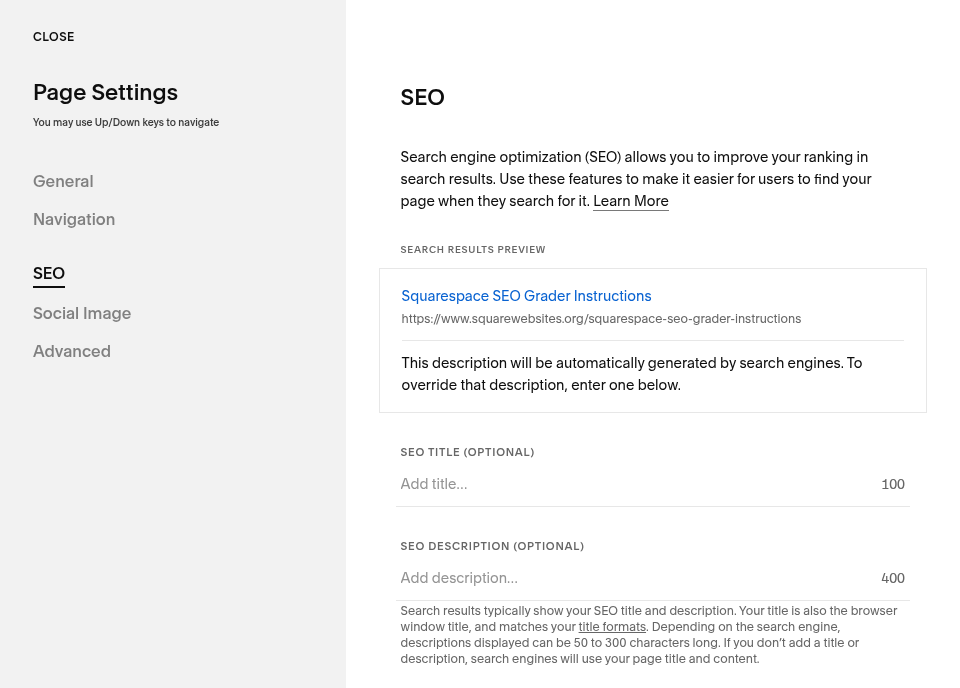
Missing Meta Description
I. What it Means?
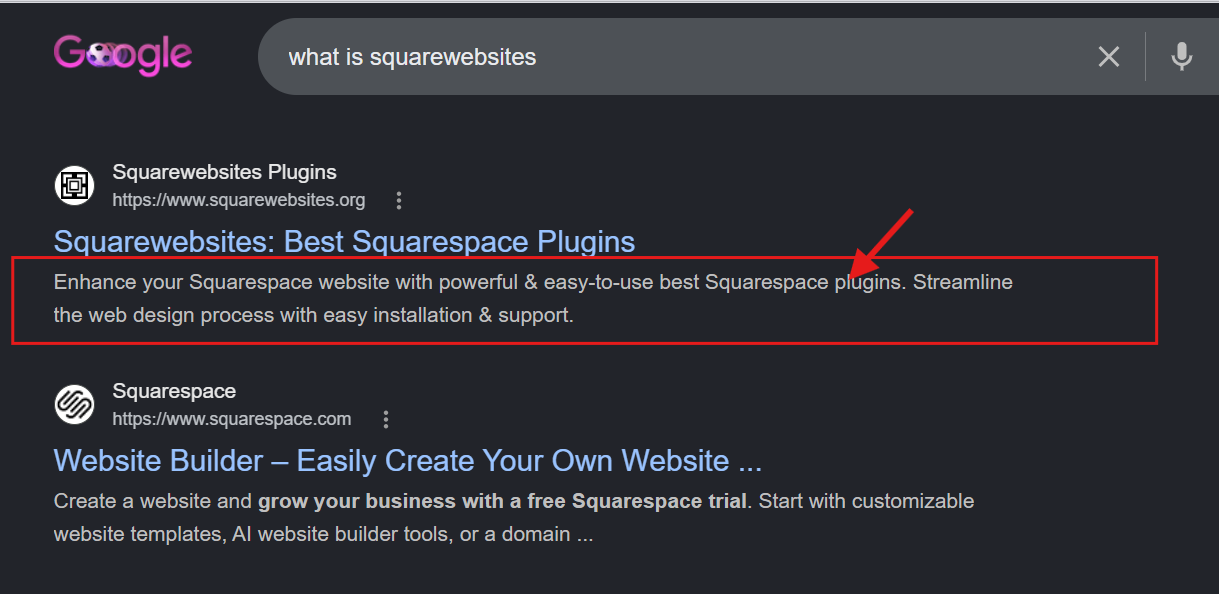
A meta description is a short summary of your page that appears in search engine results. It’s the description you see below the title of search results when you Google. And you don’t have it.
II. Why Does It Matter?
Meta descriptions help people know what your page is about. It helps them create a micro judgement before clicking, passing, or picking among a list of results. It also informs search engines what keywords and search terms is relevant to your page.
Not having a meta description means no context to your page title, no reason why people should click your page, and no instructions for search engines which audience to show your page best.
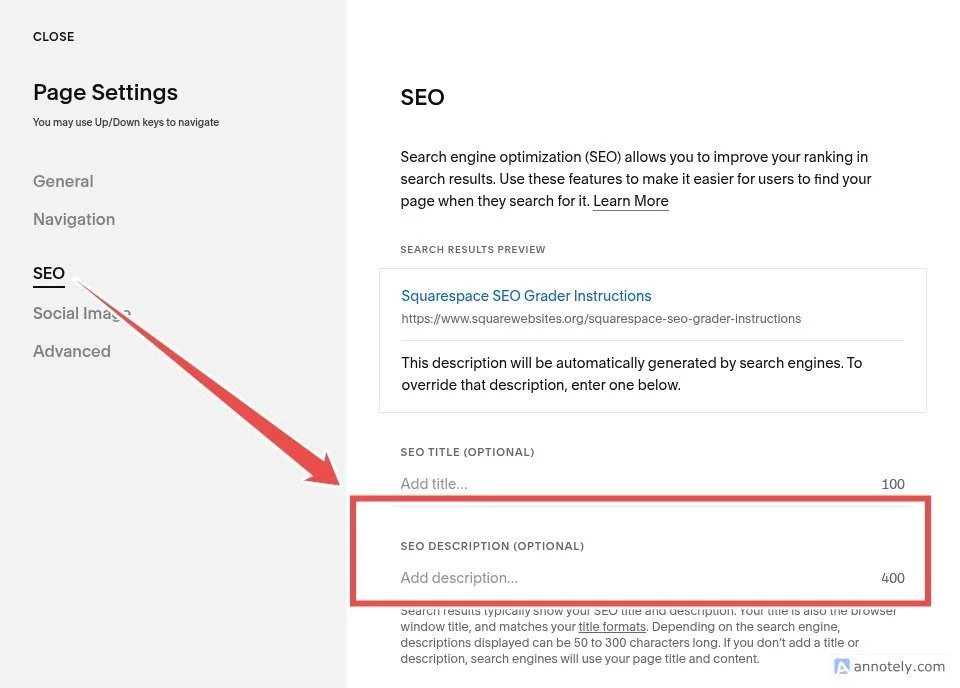
The good news - Squarespace automatically fills your SEO Description even if you don’t add them so it’s not empty. But it’ll just display the first text paragraph seen on your page regardless if it describes your page properly or not.
The better news - SEO Descriptions show up on search engine results exactly the way you add them in the SEO settings. This means you can dictate what people will read about your page on Google search.
And well-written descriptions gets clicked more times than no description.
III. How To Fix It In Squarespace
Open your Squarespace website.
Navigate to Pages.
Hover over the page and click the gear icon.
Open the SEO tab.
Enter a description in the SEO Description field.
Save your changes.
IV. Best Practices
Keep descriptions between 50–160 characters.
Clearly summarize the page.
Include important keywords naturally.
Avoid using the same description on multiple pages.
V. Examples
Poor Example:
❌ This page is about SEO.
❌ Italian restaurant in Chicago
❌ We offer pet grooming services.
Good Example:
✅ Learn how to improve your Squarespace SEO with practical optimization tips and best practices.
✅ Come and try the best deep dish pizza in Chicago! Visit us at the 123 street or call us at 123-456-789 for deliveries and reservations.
✅ Professional pet grooming in — Ketchum, ID skilled care for dogs and cats: baths, haircuts, nail trims, ear cleaning, and de-shedding. Affordable rates and experienced groomers. Call or reserve today!
Meta Description Too Short
I. What it Means?
Your page has a meta description, but it’s too short to provide meaningful information.
The meta description refers to the short summary of your page that appears in search engine results. It’s the description you see below the title of your Google search results.
II. Why Does It Matter?
Meta descriptions tells people what your page is about before they click and informs search engines what keywords and search terms is related to your page.
Very short descriptions do not effectively communicate the purpose of your page in search results. It fails to give context to your page title, fails to tell people why they should click your page, and fails to properly instruct search engines which audience to show your page best.
But a clear, descriptive summary helps people understand what you’re page is about. And well-written descriptions improves click-through rates from search results.
III. How To Fix It In Squarespace
Open Page Settings.
Navigate to the SEO tab.
Expand your SEO Description.
Add more context about the page.
Save your changes.
IV. Best Practices
Aim for 50–160 characters.
Clearly explain what visitors will find on the page.
Focus on helping users understand the page content.
V. Examples
Poor Example:
❌ This page is about SEO.
❌ Italian restaurant in Chicago
❌ We offer pet grooming services.
Good Example:
✅ Learn how to improve your Squarespace SEO with practical optimization tips and best practices.
✅ Come and try the best deep dish pizza in Chicago! Visit us at the 123 street or call us at 123-456-789 for deliveries and reservations.
✅ Professional pet grooming in — Ketchum, ID skilled care for dogs and cats: baths, haircuts, nail trims, ear cleaning, and de-shedding. Affordable rates and experienced groomers. Call or reserve today!
Missing Title
I. What it Means?
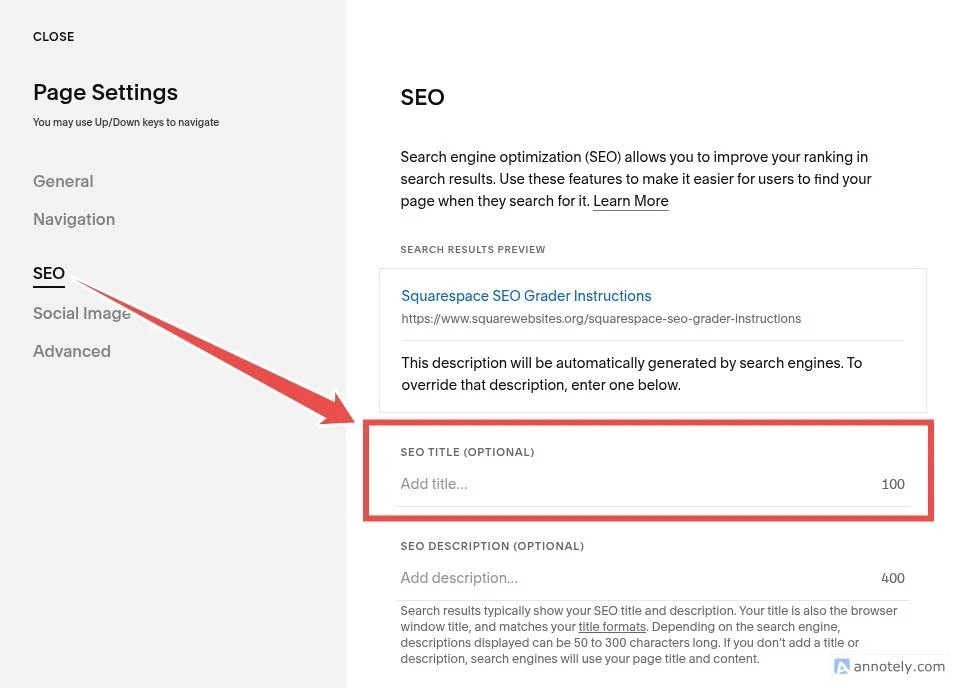
You haven’t added an SEO title to your page.
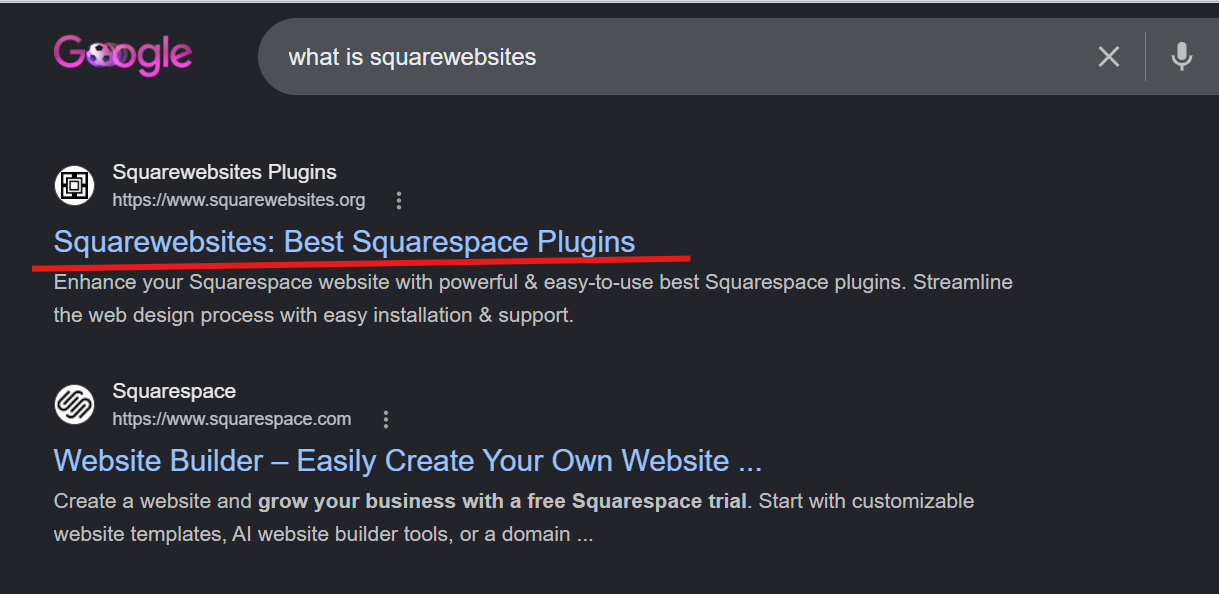
SEO Title is the title you see when you search on Google. It’s the headline, the title, the link you click; and you don’t have one.
II. Why Does It Matter?
Page title is one of the most important SEO elements. It defines how your page appears in search results and helps rank your page too.
The good news - Squarespace automatically fills your SEO title even if you don’t add them. It’ll just use the page’s title.
The better news - you can specify your page’s SEO Title. So you have total control of what people will see on Google results when they search for you.
III. How To Fix It In Squarespace
Open Pages.
Select the page.
Click Settings.
Open the SEO tab.
Enter a title in the SEO Title field.
Save your changes.
IV. Best Practices
Use clear and descriptive titles.
Include important keywords naturally.
Keep titles concise and relevant.
V. Examples
Good Example:
✅ Italian Restaurant – Best Pepperoni Pizza in Chicago
Poor Example:
❌ Italian Restaurant
Title Too Short
I. What it Means?
You have a page title but it’s too short to provide enough context to search engines. SEO Title is the title you see when you search on Google. It’s the headline, the title, the link you click.
II. Why Does It Matter?
Short titles often miss opportunities to describe the page clearly.
Imagine Googling ‘restaurant near you’ and getting 2 results. The 1st one says Italian Restaurant; 2nd one says Italian Restaurant - Best Pepperoni Pizza in Chicago. If you’re craving for pizza, you’ll be clicking the 2nd result without second guessing because it says there in the title.
A descriptive title helps people understand what you’re business or website is about. And it allows search engines to match your page to specific keyword searches.
So, following the example above, Google will not only display the 2nd restaurant for searches like ‘restaurant near me’. Google will also display it for searches related to ‘pizza’ and ‘Chicago’.
III. How To Fix It In Squarespace
Open Page Settings.
Navigate to the SEO tab.
Update the SEO Title.
Include more descriptive information.
Save your changes.
IV. Best Practices
Clearly describe the page content.
Avoid one-word titles when possible.
Keep titles relevant and readable.
V. Examples
Good Example:
✅ Italian Restaurant – Best Pepperoni Pizza in Chicago
Poor Example:
❌ Italian Restaurant
Missing H1 Tags
I. What it Means?
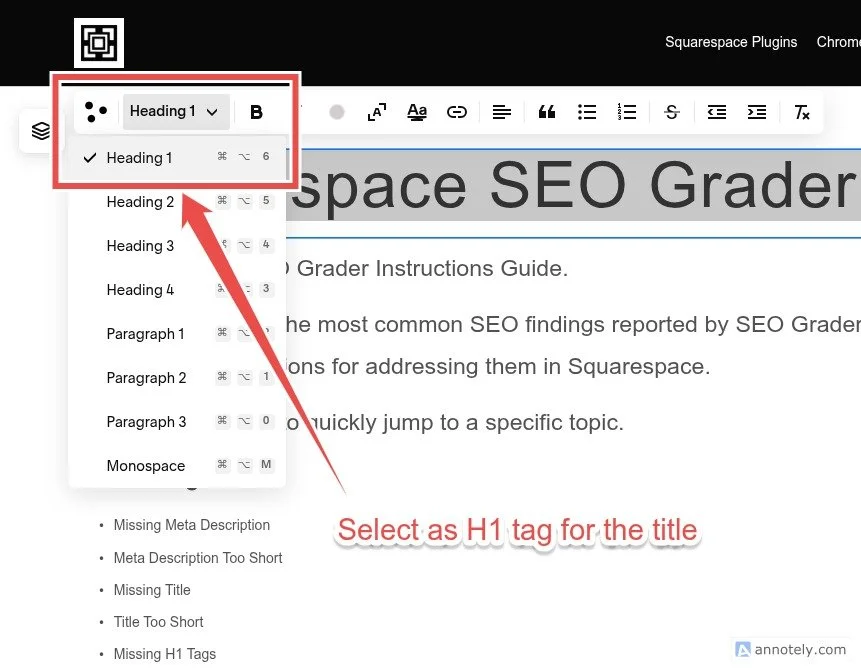
An H1 tag is typically the primary heading on a page. It’s used to tell the main topic of the page or what the page is about similar to a headline of a newspaper article or a chapter title for a book.
II. Why Does It Matter?
Search engines use H1 headings to better understand the main topic of a page. That is not to say that it only depends on H1. But just like reading a newspaper or a book, a title heading clues you to the content of the page.
III. How To Fix It In Squarespace
Edit the page.
Add a Heading Block if one does not already exist.
Set the heading type to Heading 1 (H1).
Use a clear and descriptive heading.
Save your changes.
IV. Best Practices
Use one primary H1 per page whenever possible.
Ensure the heading accurately describes the page.
Avoid generic headings.
V. Examples
Good Example:
✅ Squarespace SEO Grader Instructions
Poor Example:
❌ Welcome to the page
Duplicate H1 Tags
I. What it Means?
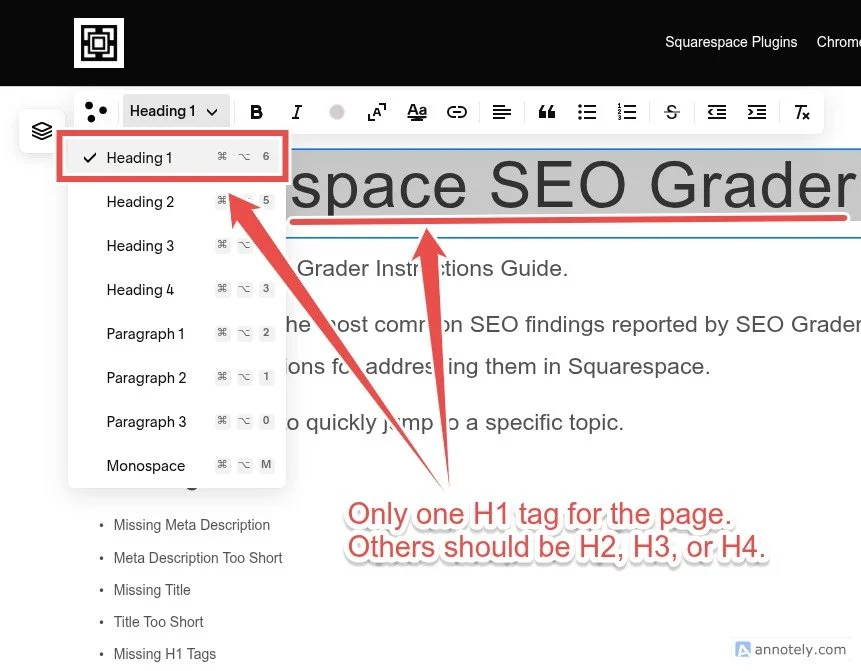
Multiple H1 headings have been detected on the same page. This means you have multiple texts using the H1 heading.
It’s a common mistake when designing your website since H1 is an easy and convenient way to increase the size of a text without doing any coding.
II. Why Does It Matter?
Multiple H1 tags can make it harder for search engines to identify the primary topic of a page. Because the hierarchy of importance for text heading goes like this: H1 > H2 > H3 > H4.
So multiple H1 makes it confusing for search engines to know which H1 text is the main topic. And you don’t want the search engine to guess between your real page topic and a ‘Thank You!’ note you added at the bottom of your page to thank your customers.
Best to tell the search engine exactly the topic of your page by exclusively using the H1 heading for it.
III. How To Fix It In Squarespace
Edit the page.
Review all Heading Blocks.
Keep one primary H1 heading.
Change additional headings to H2 or H3 where appropriate.
Save your changes.
IV. Best Practices
Use one primary H1.
Use H2 and H3 headings for supporting sections.
Create a clear heading hierarchy.
Missing Alt Text
I. What it Means?
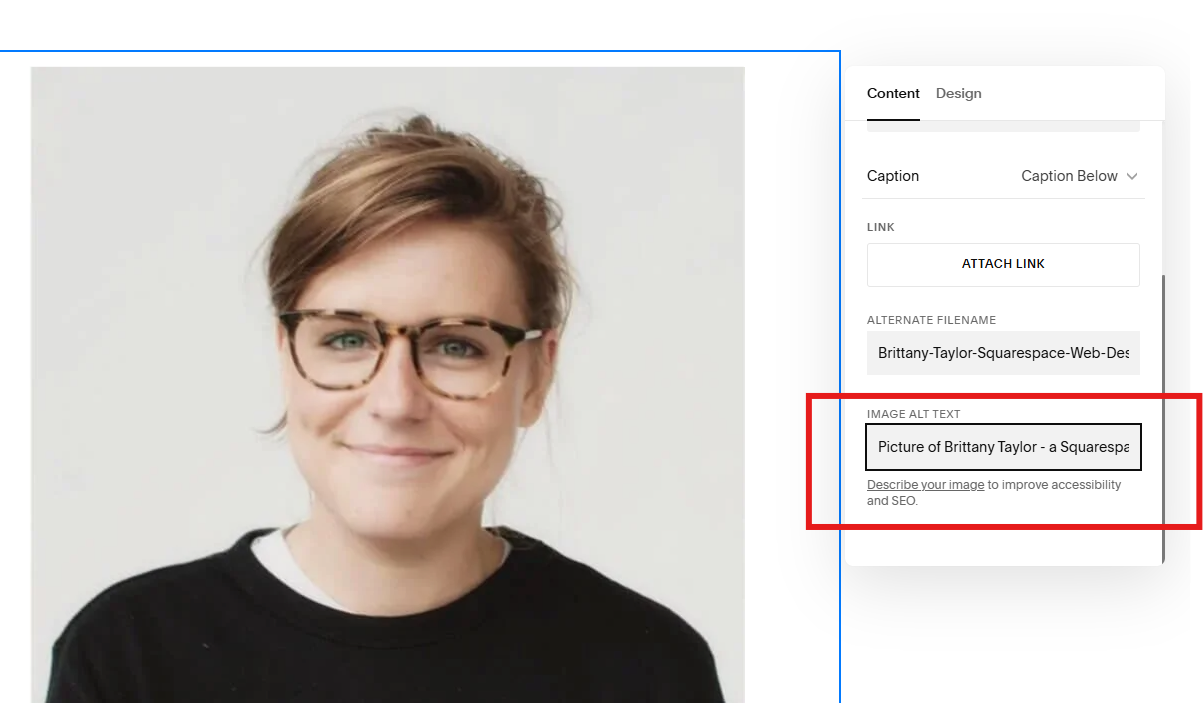
Alt text (short for alternative text) is a description added to an image to act as a backup information. In case the image fails to load, the alt text is displayed instead to tell users what the image is about.
When search engines came out they weren’t able to tell what an image is about outside from the image file title. And in most cases, image file titles weren’t very helpful because they lacked context, worst they’re just a combination of random texts and numbers like pic1, pic2 or img1, img2.
Thus, alt text has become a very useful tool for search engines to get context and description about the image helping them understand what the image is in relation to the topic and the entire page content.
II. Why Does It Matter?
Alt text helps search engines understand images and improves accessibility for visitors using assistive technologies.
III. How To Fix It In Squarespace
Edit the page.
Select the image.
Open Image Settings.
Enter descriptive Alt Text.
Save your changes.
IV. Best Practices
Describe the image accurately.
Keep descriptions concise.
Avoid keyword stuffing.
V. Example
Good Example:
✅ A woman reviewing SEO reports on a laptop.
Poor Example:
❌ Image123.jpgI
Missing Open Graph Image
I. What Is It?
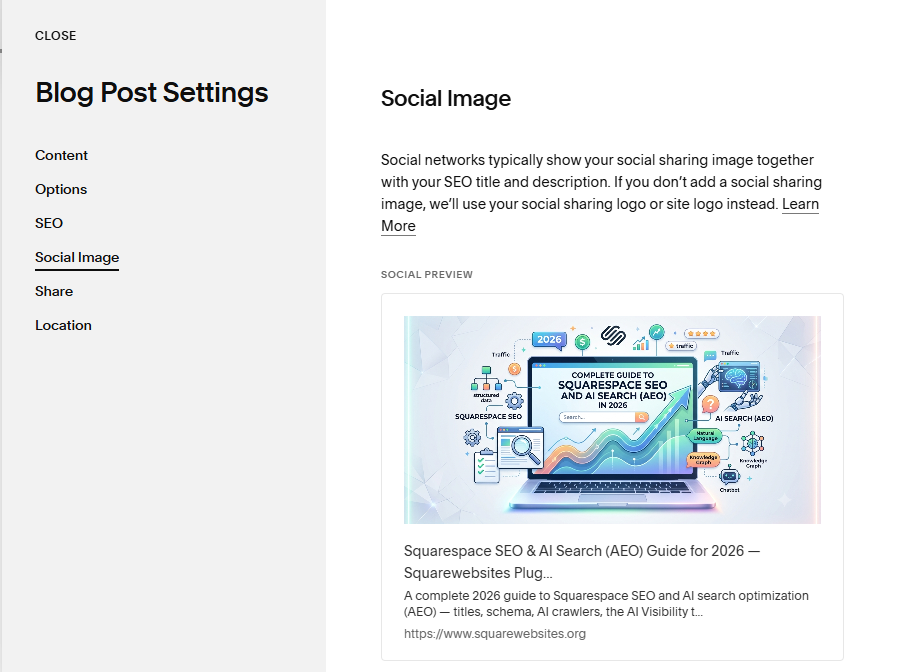
An Open Graph image is used when your page is shared on social media platforms. It’s the thumbnail/preview image that automatically shows up when you share your link on social media.
II. Why Does It Matter?
When you share a link on social media you want it to get clicks.
Pages with Open Graph images often appear more professional and engaging when shared. It also gives people a preview or clue about the content of the link you shared.
III. How To Fix It In Squarespace
Open Page Settings.
Navigate to Social Image.
Upload a Social Sharing Image.
Save your changes.
IV. Best Practices
Use high-quality images.
Ensure images are relevant to the page.
Maintain consistent branding.
Final Step
After making changes to your pages, return to SEO Grader and run a new scan to see your updated results.
SEO improvements often happen gradually over time. Focus on meaningful updates, review your recommendations regularly, and continue improving your website one page at a time.