Filter Summary Block Items
How to filter summary block items using the lazy summary plugin
IMPORTANT:
Not for blog or store pages - Lazy Summary plugin only works on summary blocks. If you need a filter for blog or store pages, get Universal Filter instead.
Not interactive - Lazy Summary does not allow your customers to change the filter you applied. If you want an interactive filter, use Universal Filter instead.
Step 1. Open the summary block settings
Double click the summary block to open the summary block settings.
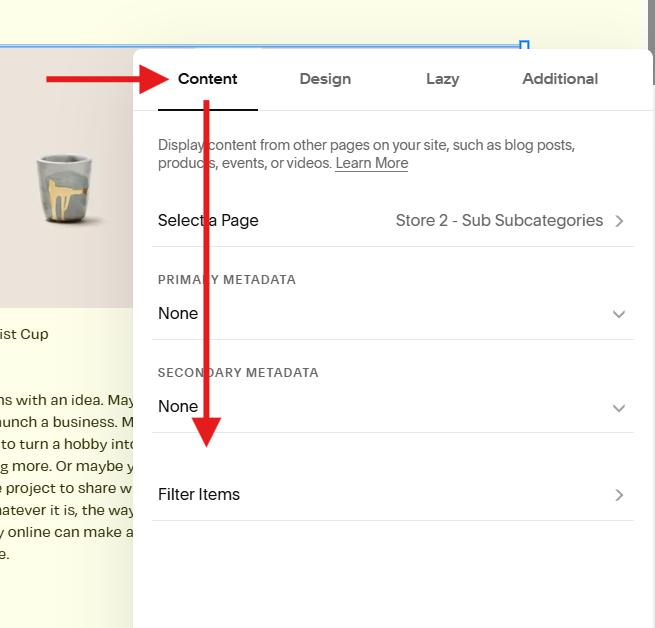
Step 2. Click Filter Items settings
In the Content tab, click Filter Items at the bottom.
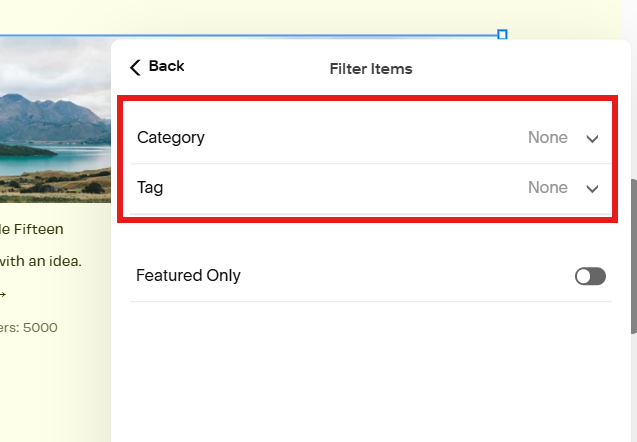
Step 3. Select filters
Select the category and tag filters you want to apply. You can apply multiple categories and tags, or a combination of both.
Multiple categories? Yes
Multiple tags? Yes
Combine category and tag filters? Yes
Step 4. Save
Click the Save button on the top left corner of the window to save your setting changes.
Need help?
Contact us. Tell us what you need and we’ll get it done for you.