
Squarespace File Limits in 2026 — How Every Major Builder Handles Uploads
Full Disclosure:
We build Squarespace tools. Our form uploader has been free since 2016. This post is a market map — and a request for feedback from people who still hit the limits below. Nothing here is a product announcement.
If you sell digital products, collect client files, or deliver video content through your website, file upload limits aren't a technical footnote. They're a revenue ceiling. A hard cap on what you can sell, how you can work with clients, and whether your platform grows with your business.
In 2026, most major website builders have raised limits, added multi-file support, or built native visitor upload workflows. But one platform — the one millions of creators chose for its design polish — has held its limits steady while competitors raised theirs.
This guide breaks down exactly where every major platform stands. We've verified every number against official documentation and current help center pages. No recycled forum rumors. No outdated limits from 2022. We also place our own free uploader on that map, say what it does not do, and ask which gaps are still worth solving.
Table of Contents
1. The State of File Uploads in 2026
2. Where Squarespace Draws the Line
3. How the Competition Compares
4. The Real Friction Points for Squarespace Users
6. Our Story: The Uploader That Predated Squarespace's Native Feature
7. [Where Our Free Uploader Stops — and What We Want to Hear](#where-our-free-uploader-stops--and-what-we-want-to-hear)
The State of File Uploads in 2026
File handling on website builders breaks down into three distinct jobs:
| Job | What It Means | Why It Matters |
|---|---|---|
| Selling digital products | Delivering paid files to customers after checkout | Revenue. If your course video, photo bundle, or sample pack exceeds the platform's cap, you can't sell it natively. |
| Collecting visitor uploads | Receiving files from clients, applicants, or leads through forms | Workflow. Wedding photographers need client selects. Agencies need brand assets. Law firms need case documents. |
| Hosting site assets | Uploading PDFs, images, and documents visitors can download or view | Content. White papers, portfolios, press kits — anything you link to directly. |
Every platform handles these differently. Some excel at one and ignore the others. Some have raised limits quietly. Some have removed features entirely. Here's what the landscape actually looks like.
Where Squarespace Draws the Line
Squarespace users don't want to leave. The templates, the typography, the mobile responsiveness — it's why photographers, designers, and boutique agencies chose the platform. But when it comes to moving files, Squarespace has some of the tightest constraints in the industry.
Digital Product Downloads: 300 MB, One File Only
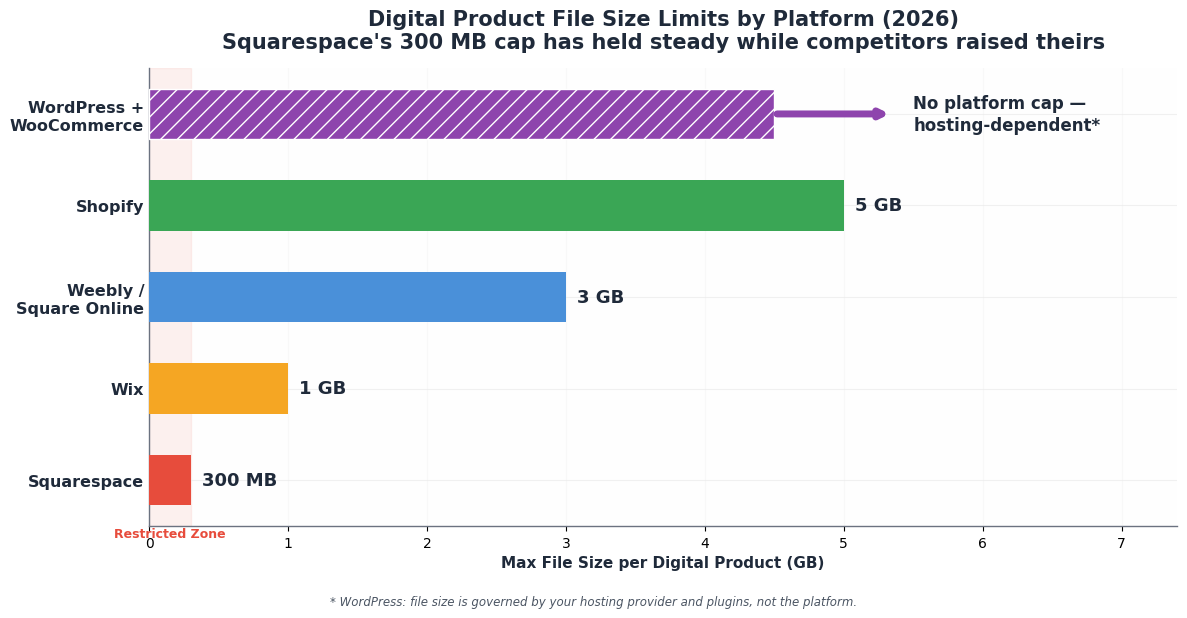
Squarespace's native digital download product caps each file at 300 MB. You can only attach one file per product. The workaround everyone uses — zipping multiple files together — still has to fit under that 300 MB ceiling.
> Source: Squarespace Help Center, Download products — “The file size limit for a download is 300 MB. All file types are accepted, but only one file can be added to each download product. You can zip files together and upload the zipped file to a download product as long as it’s under 300 MB.”
This limit has been static for years. Squarespace Forum threads from 2024 through 2026 regularly cite it as a commerce blocker. RAW photo bundles, video course modules, multi-track WAV sessions, and high-res design asset packs routinely exceed 300 MB.
The download link also expires 24 hours after purchase. If a customer clicks an expired link, Squarespace automatically emails a fresh one to the address used at checkout — and you can resend manually from the Orders panel — but the initial window is tight compared to competitors.
Site Asset Uploads: 20 MB Hard Cap
Anything uploaded through Squarespace's Link Editor — PDFs, docs, ZIPs, images — is capped at 20 MB per file. This applies to reusable, linkable assets across your entire site.
> Source: Squarespace Help Center, Uploading and managing files — “File uploads must be 20 MB or smaller.”
Visitor Uploads via Forms: A File Picker, Not a File System
Squarespace did add a native File Upload field to Form blocks. But the specs reveal how limited it really is:
5 files per submission
10 MB per file (~50 MB total)
> Source: Squarespace Help Center, Form fields explained — “You can choose which file types are accepted and how many files visitors can upload (up to 5) in the field’s settings. Each uploaded file is limited to a size of 10 MB.”
Storage exists — organization doesn't. Submissions land in the Contacts panel, where you can download each file from the submission details, and you can also route them to an email address or connected tools like Google Drive.
But there are no per-client folders, no project tags, no search across files, and no automatic routing into organized cloud folders.
This is fine for a resume or a small attachment. It collapses for any professional workflow: wedding photographers collecting client selects, agencies gathering brand assets, or attorneys receiving case documents. The files arrive; the filing system doesn't.
Video Storage: The Real Plan Differentiator
Squarespace doesn't cap overall site storage. But video is the one metered asset class, and the tiers are steep:
| undefined | Video Storage | Annual Price (USD) |
|---|---|---|
| Basic | 30 minutes | $19/mo |
| Core | 5 hours | $29/mo |
| Plus | 50 hours | $49/mo |
| Advanced | Unlimited | $99/mo |
Although if you pay annually, Squarespace will cut the price by up to 36%. You can find more about this information in their subscription page.
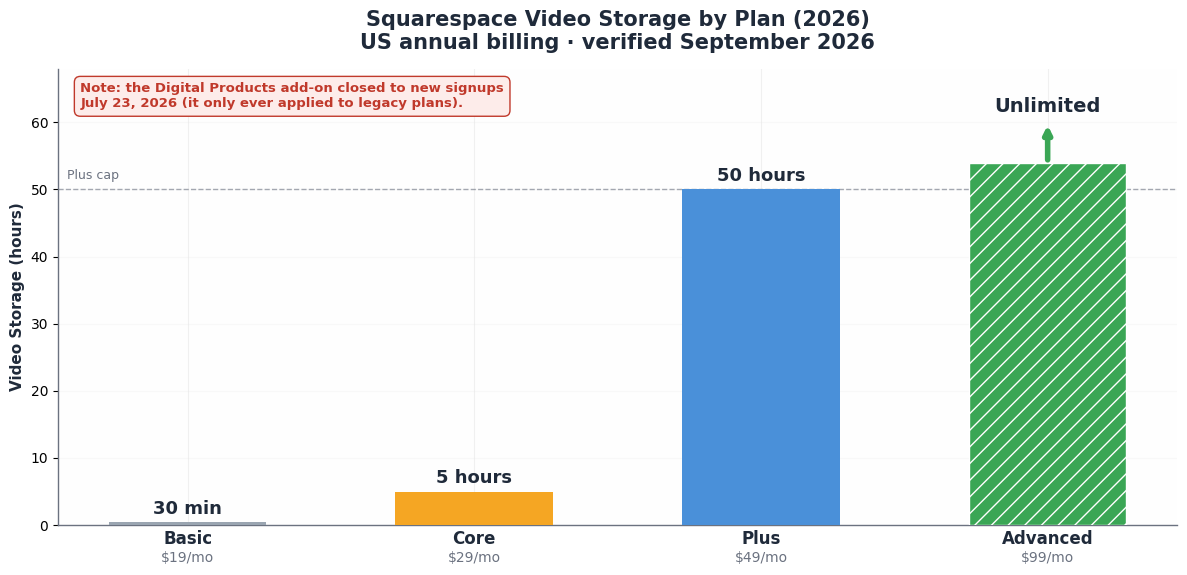
Bandwidth is unlimited on every plan. But video is the primary lever Squarespace uses to push plan upgrades.
Plan prices are US annual-billing rates following Squarespace’s July 2026 increase — verify current numbers at squarespace.com/pricing, which only renders prices when logged in.
> Source: Squarespace Help Center, Selling on the Basic, Core, Plus, and Advanced — video storage of 30 minutes (Basic), 5 hours (Core), 50 hours (Plus), and unlimited (Advanced).
This is site video (Video Blocks, background video). It is not the same thing as selling a downloadable course file. The 300 MB digital-product cap above is the commerce limit; these hours are the hosting limit.
The Digital Products Add-On Is Gone (As of July 2026)
As of July 23, 2026, Squarespace no longer accepts new signups for the standalone Digital Products add-on plan — a legacy bolt-on for older website plans (the Personal, Business, and Commerce-era structure) that lowered transaction fees and added video hours.
> Source: Squarespace Help Center, Digital Products plan pricing, billing, and invoices — “As of July 23, 2026, you can’t sign up for a Digital Products plan. Instead, upgrade your website plan to lower your transaction fees and increase video storage.”
Existing subscribers keep their add-on. The add-on never applied to the current Basic/Core/Plus/Advanced structure, so users on current plans never had that workaround to lose.
For them, the path past 5 hours of video storage has always been a plan upgrade — Core ($29/mo) to Plus ($49/mo) purely for storage headroom, or all the way to Advanced ($99/mo) for unlimited video. Where the retirement bites is legacy-plan holders and anyone counting on the cheap add-on route.
How the Competition Compares
The Headline Numbers
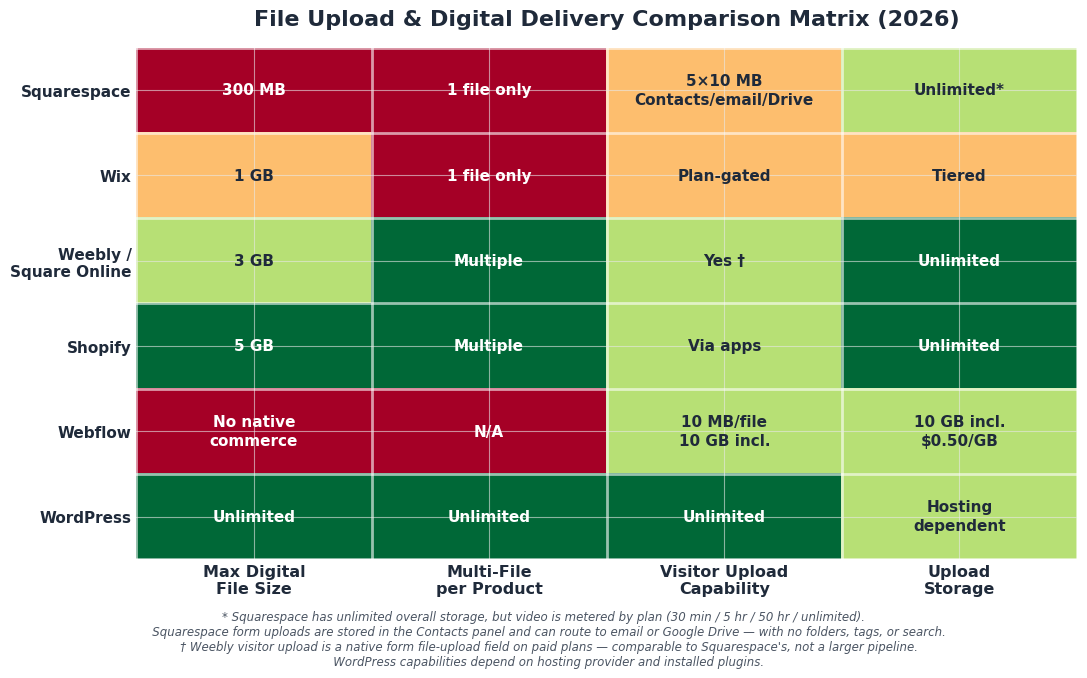
| Platform | Max File per Digital Product | Multiple Files per Product? | Visitor Uploads | Overall Storage |
|---|---|---|---|---|
| Squarespace | 300 MB | No (1 only) | 5 × 10 MB; Contacts panel, email, or Drive | Unlimited (video metered) |
| Wix | 1 GB (ZIP) | No (1 file per product) | Plan-gated forms | Tiered by plan |
| Weebly / Square Online | 3 GB | Yes | Yes | Unlimited on paid plans |
| Shopify | 5 GB | Yes, multiple per variant | Via apps/forms | Effectively unlimited |
| Webflow | No native digital commerce | N/A | 10 MB/file, first 10 GB included | 10 MB/file, first 10 GB included | Asset-based |
| WordPress + WooCommerce | Hosting-dependent (effectively unlimited) | Yes, unlimited via plugins | Unlimited via plugins | Hosting-dependent |
Platform-by-Platform Breakdown
1. Shopify leads on raw digital product specs. Its native Digital Downloads app supports 5 GB per file, multiple files per product variant, unlimited bandwidth, and configurable download limits. For stores selling large files, the gap between Shopify and Squarespace is enormous — more than 16x the per-file capacity.
> Source: Shopify Help Center, Digital downloads — “The maximum file size is 5 GB.” and “You can upload multiple files per product variant.”
2. Wix sits in the middle with a 1 GB cap per digital file — better than Squarespace, but with the same critical trap: only one file per product. If you're selling a bundle, you must zip everything together. Wix also gates visitor upload capabilities by plan, and overall storage is tiered rather than unlimited.
> Source: Wix Help Center, Adding a digital product — the supported-format table lists Zip (.zip) at 1 GB, images at 50 MB, and audio at 100 MB. To sell more than one file, Wix advises you “save them together as a ZIP file and then upload that file.”
3. Weebly / Square Online punches above its weight. Each digital file can be up to 3 GB, and critically, you can attach multiple files to a single product. This makes it genuinely viable for course creators, template sellers, and anyone bundling assets. Its visitor upload is a native form file-upload field on paid plans — comparable to Squarespace's, not a larger pipeline.
> Source: Square Community, Digital Downloads — “Each digital item can include 10 files. Each file can be up to 3 GB.”
> Unofficial source — a Square community thread, not a Square help article. Confirm in your own Square Online admin before you plan around 3 GB.
4. Webflow doesn't have native digital commerce downloads at all — it's not a direct competitor for selling files. But its form upload feature is notable: the first 10 GB of upload storage is included, then $0.50/GB/mo, with a hard cap at 100 GB. It requires a paid hosting tier rather than being available on any plan. The per-file limit is still tight (10 MB for form uploads, 4 MB for CMS file fields), but Webflow now offers a real storage business model for form attachments.
> Source: Webflow Help Center — Form file upload storage is free up to 10GB, and $0.50/month per GB after that. We place a hard storage limit at 100GB.
5. WordPress.org is the wild card. With the right hosting and plugins (Easy Digital Downloads, WooCommerce), file sizes are effectively unlimited. But unlimited comes with the complexity of managing your own hosting, security, and plugin stack.
The Real Friction Points for Squarespace Users
Ranked by revenue impact:
1. The 300 MB / One-File Digital Product Cap
Every RAW photo bundle, video course module, sample pack, or high-res design asset hits this wall. This is the single most valuable problem to solve for Squarespace creators.
2. Video Storage Is Gated Behind Plan Upgrades
Users who need more than 5 hours of site video face a $29/mo → $49/mo jump (annual billing) to Plus purely for storage headroom. Third-party video delivery (selling a file) is a different job — don’t mix it with Video Block hours when you do the math.
3. Form Uploads: A File Picker, Not a File Workflow
10 MB × 5 is fine for a resume. It collapses for any professional file collection at scale. Files do reach the Contacts panel, your inbox, or a connected Drive — but with no folders, tags, or search, organization breaks at scale.
4. The One-File-Per-Product Ceiling
Even if the 300 MB cap were raised, sellers still can't bundle course + workbook + bonus audio into one purchase natively.
The Third-Party Patchwork
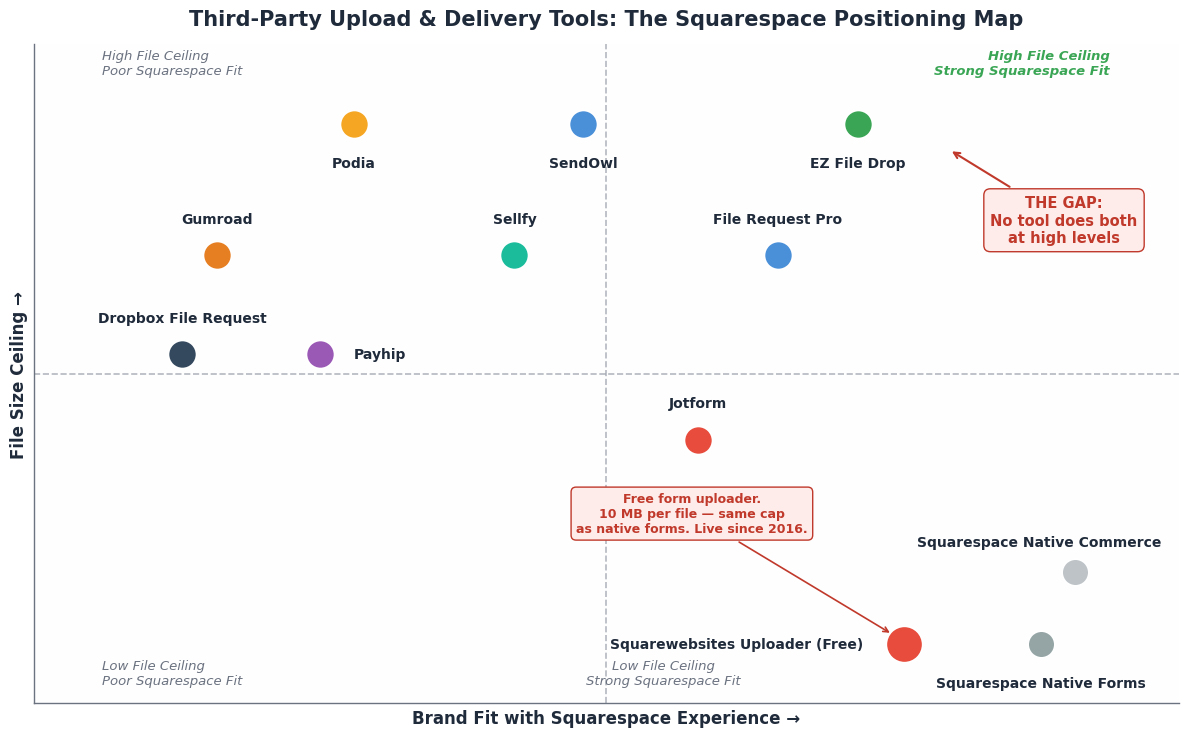
Creators aren't sitting idle. Two separate categories of third-party tools have emerged to patch Squarespace's gaps. The problem: they're completely disconnected from each other.
Category 1: Selling Large Digital Products on Squarespace
| Tool | Max File Size | Squarespace Integration | Starting Price | Key Weakness |
|---|---|---|---|---|
| SendOwl | No hard limit (1 GB via dashboard, SFTP for larger) | Embeddable buy buttons | $39/mo (Launch) | External checkout breaks brand continuity |
| Payhip | 5 GB | Embeddable | Free (5% fee) | Checkout redirect breaks Squarespace flow |
| Sellfy | 10 GB | Embeddable widgets | $19/mo | External checkout |
| Gumroad | Unlimited | Link-out only | Free (10% fee) | Abandons Squarespace brand entirely |
| Podia | Unlimited | Full platform bolt-on | $39/mo | Overkill for simple file sales |
Note on SendOwl pricing: SendOwl raised prices significantly in 2024–2025. The $18/month entry point cited in older reviews is outdated. Current Launch plan starts at $39/month with a $10,000/year sales cap.
The Universal Weakness:
None of these tools inject into Squarespace's native Commerce checkout. They live beside it. Every one forces the seller to accept a visible seam between browsing on Squarespace and checking out elsewhere.
Category 2: Collecting Files from Visitors on Squarespace
| undefined | Max Upload | Storage Destination | Starting Price | Best For |
|---|---|---|---|---|
| EZ File Drop | Admin-set (up to 150 GB) | Your own cloud (Drive, Dropbox, etc.) | $9/mo | Direct cloud routing, lowest entry price |
| File Request Pro | 1–10 GB depending on plan | Your own cloud | $29/mo | Enterprise workflows, approval logic |
| Jotform | 100 MB (free) to 10 GB (enterprise) | Jotform servers | Free tier | Form flexibility, not file management |
| Dropbox File Request | 2–50 GB depending on plan | Dropbox | Free with Dropbox | Duct-tape solution, zero brand consistency |
The Strategic Gap
Here's what nobody currently owns:
| Job to Be Done | Best Current Tool | Native to Squarespace? | | Uses Squarespace Checkout? |
|---|---|---|---|
| Sell a 2 GB file | SendOwl | No (embed) | No |
| Sell a 2 GB file inside Squarespace's own checkout | Nothing exists | - | - |
| Collect large client files | EZ File Drop | No (embed) | N/A |
| Do both from one dashboard | Nothing exists | - | - |
The two categories don't talk to each other. A photographer who wants to (a) sell 800 MB gallery packs and (b) collect 5 GB of raw client selects has to buy two tools, learn two dashboards, and maintain two embeds.
Our Story: The Uploader That Predated Squarespace's Native Feature
In 2016, Squarespace forms had no file upload field at all. Not a limited one. Not a hidden one. None. If you wanted a client to upload a photo, a PDF, or a document through your Squarespace form, you had two options:
Pay for Wufoo or JotForm and deal with their form view limits
Tell your client to email you the file
We built Squarewebsites Uploader to solve that. A simple JavaScript snippet. A text field in your Squarespace form with `FileField;` in the description. Drag-and-drop support. Multiple files. Google Drive integration so files never sat on our servers longer than they had to.
And we made it free. Not freemium. Not free-with-ads. Free.
For 10 years, thousands of Squarespace sites have used it. Photographers collecting client selects. Designers receiving brand assets. Small businesses taking custom order attachments.
The uploader worked because it was invisible. It looked like part of Squarespace. It felt native. It didn't redirect your users to another domain. It didn't break your brand.
Then Squarespace Caught Up — Partially
In 2024–2025, Squarespace finally added a native File Upload field to Form blocks. We watched this closely. For a while, we wondered if our free tool had become obsolete.
But the numbers told a different story:
Squarespace's native upload caps each file at 10 MB
Our free uploader also caps at 10 MB per file (with a 1 MB default if you don’t configure `MaxSize`)
Squarespace's native upload stores submissions in the Contacts panel — a contact record, not a file system. No per-client folders, no project tags, no search across files
A Google Drive connection exists, but everything lands in one flat stream of submissions —
no per-client foldering, no naming rules, no project routingOur uploader still got sign-ups. Still got thank-you messages. Still got feature requests.
Why? Because even after Squarespace added the feature, they didn't solve the workflow. They added a file picker. They didn't add a file system.
Where Our Free Uploader Stops — and What We Want to Hear
The free uploader is a form file handler. That is all it was designed to be.
Max 10 MB per file (files still pass through our server, including when Google Drive is connected)
Files we host may be deleted after 30 days — download them, or send them to Drive
It does not sell files
It does not bundle products
It does not lift Squarespace’s 300 MB commerce ceiling
It is still live for simple form uploads
Those walls are real. We have not decided what, if anything, we build next. Before we do, we want the unvarnished version from people who run this on a real site.
Useful notes look like:
I collect / I sell / I do both
The file size that actually broke the workflow
What you bolted on (Drive, EZ File Drop, SendOwl, email, nothing)
Whether staying inside the Squarespace checkout matters, or only the file arriving does
One paragraph is enough. No launch list. No pricing. We’re in discovery.
What to Do Next
If you're building or buying a file upload solution for Squarespace in 2026, here's the decision framework:
If you only need simple form uploads under 10 MB:
Our free uploader still works. So does Squarespace's native File Upload field. Use whichever feels better in your workflow.
If you sell video courses or files over 300 MB:
Third-party delivery is essentially mandatory today. Compare the total cost of a tool like SendOwl ($39+/mo) against upgrading to Squarespace Plus ($49/mo) or Advanced ($99/mo) only if what you need is site video hours.
For downloadable files, external delivery is the current answer.
If you collect files from clients:
EZ File Drop is the most Squarespace-friendly option at the entry price point ($9/mo). If you need approval workflows or reminder automation, File Request Pro is the step-up.
If you use Squarespace and these limits have cost you a sale or a messy client handoff:
Tell us what you ran into. File size, selling vs collecting, what you use now.
If you need both selling AND collecting today:
You need two tools. That gap is real. We have not shipped the thing that closes it.
Key Takeaways
Squarespace's 300 MB digital product cap is unchanged and increasingly out of step with the market (Shopify 5 GB, Weebly 3 GB, Wix 1 GB).
Native form uploads exist, but they're a file picker, not a file system (5 × 10 MB; Contacts panel storage with no folders, tags, or search).
The Digital Products add-on closed to new signups on July 23, 2026. It only ever applied to legacy website plans — on current plans, more video storage has always meant a plan upgrade.
Video storage hours and digital-product file size are different jobs. Don’t price them as one problem.
WordPress and Shopify are leave-Squarespace answers. The real opening is still a stay-on-Squarespace answer.
Our free uploader solved a real problem in 2016. Squarespace caught up partially in 2024–25. The next layer — organized collection, large-file delivery, staying inside Squarespace checkout — is still open. We’re listening before we build.
Verified as of September 2026 against official Squarespace, Shopify, Wix, Weebly, and Webflow documentation. Limits change — always check current help center pages before making platform decisions.
About Squarewebsites
We build plugins and tools that extend what Squarespace can do — without forcing you to rebuild your site somewhere else. Our free uploader has served thousands of sites since 2016. If these limits have hit your site, tell us.
Questions? Email info@squarespacewebsites.com.