 Image 1 of 2
 Image 2 of 2
What You Need to Know
-
Platform Compatibility: Custom Table Block plugin works on Squarespace 7.0 and 7.1.
Subscription Plan: It works on Business and Personal plans
Price: One time fee of $45
Free in SquareTools Extension ProSupport: Customer support is included in the one-time payment
-
Custom Table Block plugin works on all types of pages on your site because it works like a regular content block. So you can add it to page sections, blog page, product page or pages behind a paywall.
You can also use it with the Universal Filter to add filtering, sorting and searching to your table.
-
Custom Table Block ONLY works in Squarespace.
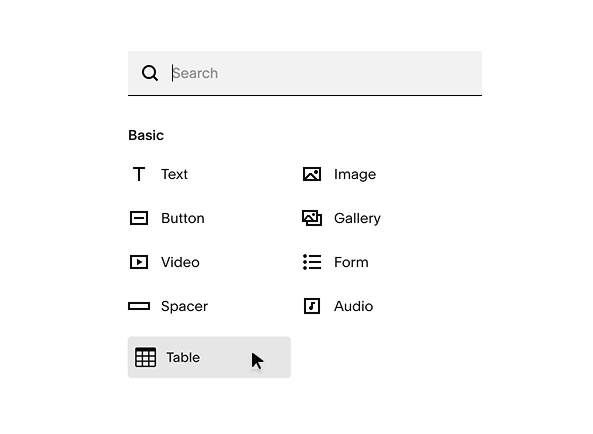
Custom Table Block offers 3 options to add table data.
We recommend Syncing a Google sheet or uploading CSV file methods over adding your data manually because the manual option’s delete row/column is unavailable.
-
No Coding Required
There is NO coding involved in installing and using the plugin. Just copy and paste the installation code to activate the custom table block into your content block menu.
Adding Table Data
You can add data to your able using any of these options:
Sync a published Google Sheet (recommended)
Upload a CSV file
Type manually
This Squarespace plugin uses the Markdown block to create tables. It hooks a markdown block and builds an HTML5 table so you can display texts, images and links.
-
You just need to copy/paste the installation code to activate the custom table block.
The installation code will be emailed to you when you purchase advanced map block.
You can find installation and setup instructions in this guide.
And if you need help with installing or setting up, contact us and we’ll get you sorted.
-
Due to the assumption that people use mobile phones in portrait instead of landscape, we prioritized the table’s readability over aesthetics.
Thus, the table does not shrink to fit the screen (like it does in website display) because that would make the table difficult to read in portrait view. Instead, the table is displayed by columns with the table headers frozen so you can keep reading the data in their normal font size.
Can you display the whole table on mobile?
Yes, you can. If you prefer the whole table displayed instead of scrolling through rows of data, you just change the CSS setting.
-
Customer support is included in the one-time fee you paid.
If you need help, ran into an issue, or have any questions, contact us.
-
Custom Table Block uses your site’s font style and color theme by default. And if you want to change the styling, you can use Custom CSS.
This is technical but a very flexible styling option. It will use some coding but you don’t necessarily need to come up with the code.If you need help with this option, tell us how you want to style your table and we’ll give you the code.
What does the table look like?
Here’s an actual sample of the table block with texts and images.
| Scoring Place | Dog Name | Dog Breed | Dog Owner Name | Image |
|---|---|---|---|---|
| 1 | Fredinant | Mixed/Mutt | Franklin Roosevelt |  |
| 2 | Mister Darcy | Basset Hound | Jill Heath |  |
| 3 | Estella | Wirehaired Pointing Griffon | Kyle Pemberton |  |
| 4 | Gruff | Bullmastiff | Glen Smith |  |
| 5 | Timmy | Golden Retriever | Hurley Plimpton |  |
| 6 | Munches | Mixed/Mutt | Missi Lynn |  |
| 7 | Ralphie Dean | Bichon | Tanya Francis |  |
| 8 | Wally | Beagle | Gary Snoopy |  |
| 9 | Dr. Frankenstein | Mixed/Mutt | Brian Cummings | |
| 10 | Hooper | Boxer | John Doe |  |
| 11 | Corndog | Chocolate Lab | Si Robertson |  |
Frequently Asked Questions
-
Yes, you can simultaneously use Custom Table Block to add multiple tables on a page, across multiple pages or on multiple Squarespace websites.
If you’re adding multiple tables in 1 page section, make sure to separate them with a spacer or a line block because Squarespace automatically merges similar blocks into 1 like with text blocks, for example.
So to avoid your tables getting merged, separate them with a content block — a spacer, a text block, or a line block. Or place your tables in different sections.
-
Custom Table Block plugin ONLY works in Squarespace.
So, no you can not use it on WordPress, Shopify or other non-Squarespace platforms, it will not work. -
Yes, you can use Custom Table Block plugin on Personal plans or non-Business subscriptions. You do not need to get or upgrade to a Business plan to use it.
-
Yes, you can use Custom Table Block on websites that are still under development. You do not need to wait for your website to finish to use this plugin.
You can even use it on trial sites so you can show your clients tables on your demos.
-
There is NO coding involved in installing the plugin, so coding knowledge is NOT needed.
You just need to copy/paste the installation code one time to activate and load the custom table block to the content block menu.
-
Customer support is included in the one-time fee you paid. If you need help, ran into an issue, or have any questions, contact us.