
The Complete Guide to Squarespace SEO and AI Search (AEO) in 2026
Search has changed. People still type queries into Google, but more and more they ask ChatGPT, Perplexity, Gemini, and Google's own AI Overviews — and those tools answer by quoting and citing web pages.
If your Squarespace site isn't structured to be that cited answer, you're invisible in the fastest-growing part of search.
This guide covers both halves of modern Squarespace search visibility: classic SEO (ranking in Google results) and AEO — answer engine optimization (getting quoted and cited by AI search tools). It's written specifically for Squarespace 7.0 and 7.1, including the platform's real limitations and the exact settings that matter.
Everything here is what we actually do on our own Squarespace sites.
What matters most for Squarespace SEO and AEO in 2026?
Quick Answer:
If you only do 5 things:
Write content that directly answers real questions, with the question as a heading and the answer in the first one or two sentences.
Fill in every page's SEO title and meta description, and add alt text to every meaningful image.
Add structured data (schema) — especially FAQ schema and, for stores, product schema.
Make sure AI crawlers aren't blocked in Settings → Crawlers.
Build trust off your site — reviews, backlinks, and genuine mentions on Reddit, YouTube, and forums.
The rest of this guide explains each in depth.
Part 1 — Classic Squarespace SEO fundamentals
i. What Squarespace does automatically
Squarespace handles a surprising amount of technical SEO for you. Out of the box it generates a sitemap at ‘/sitemap.xml’, produces clean semantic HTML, serves content server-side (so search engines can read it without running JavaScript), supports HTTPS, and is mobile-responsive.
It also auto-generates some structured data: ‘WebSite’ schema on your home page, ‘Article’ schema on blog posts, and ‘Product’ schema on store products.
That foundation is good. What Squarespace does not do automatically is the part most sites get wrong: per-page titles and descriptions, alt text, custom schema like FAQ, and the content quality that actually earns rankings.
ii. Page titles and meta descriptions
Every page needs a unique, descriptive SEO title and meta description. In Squarespace, set these under each page's settings, in the SEO panel.
SEO Title: aim for roughly 50–60 characters, lead with the topic, keep it natural. "Squarespace Templates Directory — Curated 7.1 Designs" beats "Templates."
Meta Description: roughly 150–160 characters, accurate and compelling. This is your sales pitch in the search result; write it for a human.
A common Squarespace 7.0 trap: Index Pages have inherited SEO settings, so child pages can silently reuse a parent's title and description.
Always set per-page values explicitly rather than assuming.
iii. Headings and structure
Use one H1 per page (Squarespace usually maps your page or post title to it), then logical H2 and H3 sub-headings. This helps both readers and AI tools parse your content.
Break text into short paragraphs, use bullet and numbered lists, and add tables where they fit — these formats are easy to scan and easy for AI engines to extract.
iv. Images and alt text
Every meaningful image needs descriptive alt text — not "image1.jpg" but "Universal Filter dropdown filtering products on a Squarespace store." Alt text helps image search, accessibility, and your overall content-completeness score.
If you have a large site, this is often the single biggest cleanup task.
v. Internal links
Link related pages to each other in the body of your content — a blog post should link to the relevant product page, and product pages should link to related guides. Internal links spread ranking signals and help both users and crawlers discover your pages.
vi. Speed and Core Web Vitals
Squarespace is reasonably fast by default, but you can hurt it. Compress large images before uploading, avoid stacking heavy third-party scripts in code injection, and don't overload pages with auto play video.
Check your pages periodically in Google's PageSpeed Insights.
Part 2 — AEO: optimizing for AI search
Answer Engine Optimization is about being the source AI tools quote. ChatGPT, Perplexity, Gemini, Copilot, and Google's AI Overviews all read the web, then synthesize answers and cite pages.
AEO is how you become one of those citations.
a. How AEO differs from SEO
Classic SEO aims for a ranked link. AEO aims for a quoted answer. The overlap is large — both reward clear, authoritative, well-structured content — but AEO puts extra weight on a few things:
Directly answering a specific question, ideally in the first one or two sentences.
Clean structure AI can lift verbatim: FAQs, lists, tables, definitions.
Trust signals from across the web, because AI engines cross-check claims against independent sources before citing you.
b. Make sure AI crawlers can reach you
AI tools can only cite what they can crawl. On Squarespace, the control is in Settings → Crawlers, where there's a toggle labeled "Block known artificial intelligence crawlers." If you want to appear in AI answers, that toggle should be off.
Important Squarespace detail: your ‘robots.txt’ is managed by the platform, and it lists many AI crawler names (GPTBot, ClaudeBot, Google-Extended, and others) near the top.
Seeing those names looks alarming, but unless there's a ‘Disallow: /’ rule beneath them, they're not blocked — they simply inherit the same harmless rules as everyone else (blocking admin and duplicate URLs).
Don't try to hand-edit ‘robots.txt’ on Squarespace; it's overwritten by the platform. Use the Crawlers toggle instead.
c. Structure content as answers
For any question you want to win — say, "How do I add filtering to a Squarespace site?" — build a page or section that:
Uses the question as a heading.
Answers it directly in the first one or two sentences.
Follows with a short how-to, list, or table.
Includes an FAQ for related sub-questions.
This is the shape AI engines lift word-for-word. It's also why thin, vague pages rarely get cited.
d. Add structured data (schema)
Schema is machine-readable context that helps AI and search engines understand your page. The highest-value types for most Squarespace sites:
FAQ Page — for any page with a real FAQ. AI engines and Google "People Also Ask" pull these directly.
Product (with Offer and, when you display reviews, AggregateRating) — for store products. This can produce star ratings in search results.
BreadcrumbList — gives search engines your site hierarchy and can show breadcrumb trails in results.
Organization — tells AI who you are, with your logo, contact, and social profiles.
Squarespace adds some of these automatically (Article, Product, WebSite). FAQ and Breadcrumb schema you typically add yourself through code injection.
If you're not comfortable with code, this is a good place to use a plugin or hire help.
e. Use Squarespace's built-in AI Visibility tool
Squarespace includes an AI Visibility tool in the SEO panel that tests how often your site is mentioned in ChatGPT for a set of prompts — both branded (your name) and non-branded (category questions like "best Squarespace plugins").
Set up a mix of both and check it each refresh cycle (every 7 or 14 days depending on your plan). Branded mentions confirm the AI knows you exist; non-branded mentions are where new customers discover you, so that's where to focus.
Part 3 — Build trust off your site
Both Google and AI engines weigh how the rest of the web talks about you. This is often the deciding factor for non-branded queries.
Reviews: collect and display genuine customer reviews. Squarespace can request reviews automatically a couple of weeks after purchase — turn that on.
Backlinks and roundups: get included in "best of" lists and resource pages in your niche.
Community presence: answer the exact questions your customers ask on Reddit, Quora, the Squarespace Forum, and YouTube — genuinely helpful, not spammy.
Consistent identity: keep your name, logo, and details consistent across your site, Google Business Profile, Bing Places, and your social profiles, so AI tools can confidently identify you as one entity.
Part 4 — A practical Squarespace SEO
+ AEO checklist
Work through this in order; the early items have the highest impact.
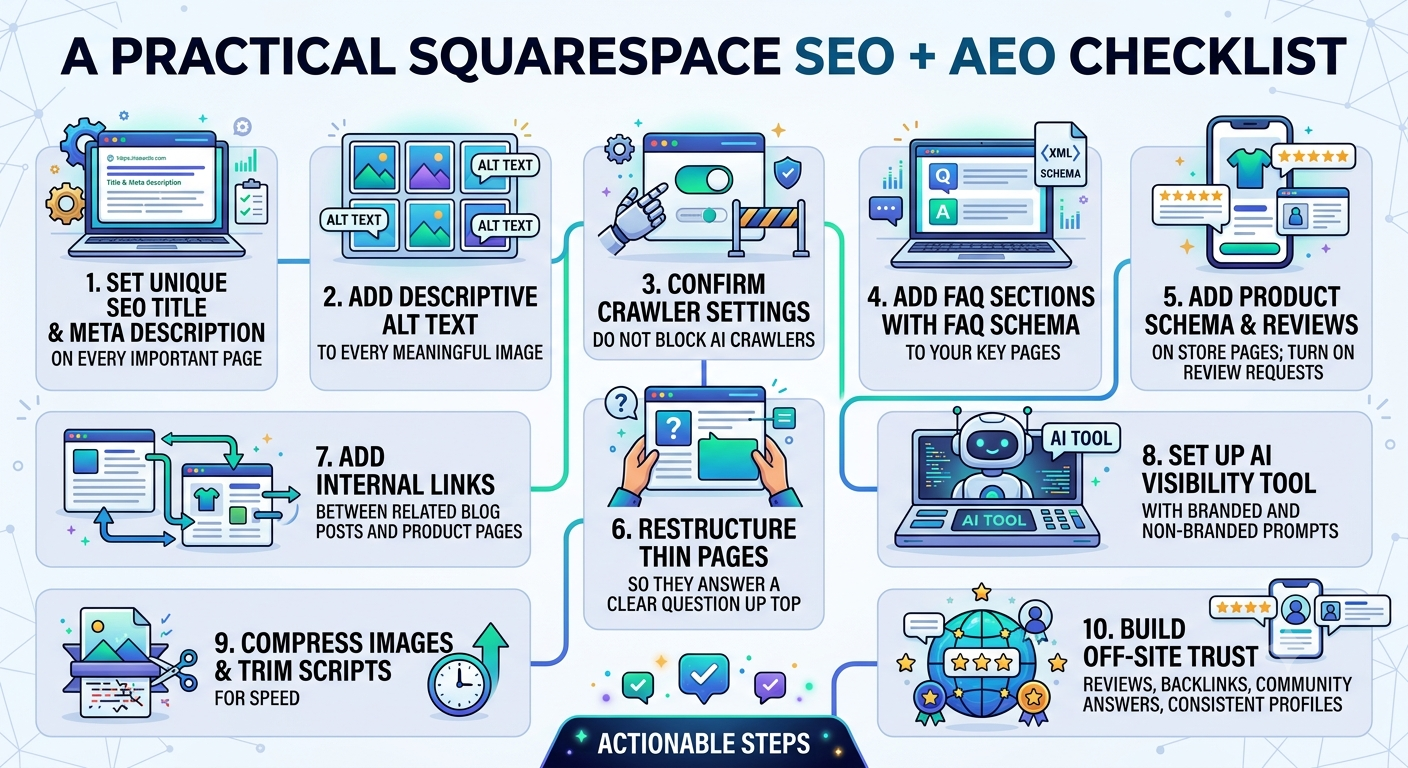
Set a unique SEO title and meta description on every important page.
Add descriptive alt text to every meaningful image.
Confirm Settings → Crawlers does not block AI crawlers.
Add FAQ sections (with FAQ schema) to your key pages.
Add Product schema with reviews on store pages; turn on review requests.
Restructure thin pages so they answer a clear question up top.
Add internal links between related blog posts and product pages.
Set up the AI Visibility tool with branded and non-branded prompts.
Compress images and trim heavy scripts for speed.
Build off-site trust: reviews, backlinks, community answers, consistent profiles.
Here’s an infographic image you can download to easily remember this checklist.
Frequently asked questions
-
Yes. Squarespace handles core technical SEO automatically — sitemaps, clean HTML, mobile responsiveness, HTTPS, and some structured data.
To rank well you still need to do the on-page work: unique titles and descriptions, alt text, strong content, and internal links.
-
AEO is optimizing your site to be quoted and cited by AI search tools like ChatGPT, Perplexity, Gemini, and Google's AI Overviews.
It overlaps with SEO but puts extra weight on directly answering questions, clean structure (FAQs, lists, tables), structured data, and trust signals from across the web.
-
Make sure AI crawlers aren't blocked (Settings → Crawlers), structure your content to directly answer real questions, add FAQ and other schema, and build trust off-site through reviews, backlinks, and community mentions.
Then track your progress with Squarespace's AI Visibility tool.
-
Not unless you turn on the "Block known artificial intelligence crawlers" setting under Settings → Crawlers.
The platform's robots.txt lists AI crawler names, but listing them is not the same as blocking them — they're only blocked if that toggle is on.
-
Yes, but it's not built in for arbitrary pages — you add FAQ Page schema through code injection (or with a plugin).
Squarespace does automatically add some schema, like Article on blog posts and Product on store items.
-
No plugin is required for the fundamentals — titles, descriptions, alt text, and content are all native settings.
Plugins and custom code help when you want things Squarespace doesn't do natively, like FAQ schema on every page, advanced filtering, or richer structured data.
-
Classic SEO changes typically take a few weeks to a few months to show in rankings.
AI search results lag too — after you publish or update content, expect roughly two to six weeks before AI tools re-crawl and reflect it.
Check your AI Visibility tool once per refresh cycle rather than daily.